
 eaxScada|Web SCADA and HMI for production
Industrial SCADA.
Secure by design.
Every user signed in. Every command checked. Every record kept.
Unlimited Tags, Displays & Clients • Every Feature in the Live Demo • Early Access
eaxScada is one server program for the control room and the plant floor: drivers for your PLCs, a columnar historian, ISA-18.2 alarms, a hash-chained audit trail and e-signatures, recipes and batch records, and web screens designed and run in the browser. Pro adds part and lot genealogy, OEE and downtime, and PDF and Excel reports; Enterprise adds high availability and the signed shift log. Every paid edition has unlimited tags, displays and clients, with no database server or message broker to install.
eaxware is in early access: nothing is sold or downloadable yet. Builds for Windows and Linux, on x86-64 and ARM64.
No screen, Studio or API call without a user
Each record on disk before the action • Starter and up
DuckDB columnar store, every edition
Nobody is trusted by default.
Not the browser, not the network.
Every person signs in, every request is checked against their role on the server, and every command to equipment passes the same write checks, whoever or whatever sent it.
Nothing opens without a signed-in user
Every screen, the Studio, the live data and every API route need a session or an API token; only sign-in, a health check and static files are public. A new install has no shared default password: the first Administrator password is random, readable only on the server, and must be changed at the first sign-in.
No editing without the right role
The Studio opens only for a signed-in user, and every change to a project, a screen or a deploy needs an engineering role, checked by the server on each request. Operators run screens; they do not edit them.
Every command checked on the server
A tag write from a screen, a screen script, the API, an AI client or a broker command goes through the same server checks: known tag, limits, interlocks, confirmation and signature. What the browser shows never decides what reaches the plant.
Read and write rules per tag path
Rules per role, group or user say which tag paths each person may read and write, and a DENY always wins. Rules you add are least-privilege: a path no rule allows is refused. A user never receives a value, an alarm or a history they may not read.
Signed commands and e-signatures
A tag can require a signature from outside writers: unsigned commands for it are refused, and each accepted one records who signed it. In the operator runtime, an e-signature is the signed-in user re-entering their password, with the meaning shown; the password is never pre-filled.
AI proposes, a person decides
The AI co-pilot account writes nothing itself. It stages a setpoint; a person approves it with their own password, and the write is checked and recorded as that person’s. The account that staged a change cannot approve it.
Recorded before it happens
Tag writes, deploys, alarm changes and security changes write their audit record first. When the record cannot be written, the action is refused and nothing changes.
Fails closed
When the server cannot read a person’s rules, it refuses rather than guessing; when the security store is down, sign-ins and permission checks are refused for everyone. Five wrong passwords lock an account for 15 minutes (IEC 62443 SR 1.3).
Single sign-on
LDAP / Active Directory and OIDC / OAuth2 sign-in, with the same roles and rules. eaxPLC calls need a signed PLC token or an eaxScada session with the right role.
What the plant did.
Exactly as it was recorded.
A record you cannot trust is worse than no record. eaxScada commits before it acknowledges, never hides a gap, and lets an inspector check the trail at any time.
A historian in the server, every edition
History goes into the embedded DuckDB columnar store, built into the server program: no database server to install, run or patch. Upgrading the licence keeps the history where it is.
Committed before it is acknowledged
The stores write in database transactions and acknowledge only what they have committed. Each audit record is its own committed transaction, on disk before the action that wrote it goes ahead.
No silent gaps
When the store does not take a write, the points wait in order in a spool on disk and are written as soon as it does; none is lost while the spool has room. A point that is lost is counted and raises a system alarm, never dropped silently.
Built for crashes and power cuts
A store that fails a write is closed and opened again before anything else is acknowledged. A file a power cut left unopenable during a checkpoint, its data intact, can be repaired from a verified copy, signed by an administrator; it is never changed automatically.
A tamper-evident audit trail
Records are chained with SHA-256 in their own database, separate from the historian. Verify finds a changed, inserted or removed record, and a trail cut short or replaced by an older copy. A trail that cannot be read is reported, never shown as complete.
Signatures bound to what was signed
An e-signature is recorded with its meaning in the record it signs. A batch release covers the record as it stood when signed, so a record changed afterwards, or a signature copied to another batch, fails the check.
Quality is never improved
Bad and uncertain values stay marked in datasets, analytics results and reports, by more than colour; a total is good only if every value in it is good, and simulated values are flagged.
Backups that are checked
A verified nightly snapshot of the historian, and server backups that carry the audit trail only after its chain, record count and last record are checked. A restore puts the audit trail back only when its copy checks out.
Encryption at rest
Transparent encryption of the historian, and of the audit trail with it. A missing or wrong key never falls back to a plain file.
More than screens and dashboards.
The records an inspector asks for.
Batches, lots, signatures, shifts and reports are part of eaxScada itself, in the same server, under the same users, rights and audit trail.
21 CFR Part 11 and EU Annex 11
Designed to support Part 11 and Annex 11: a computer-generated, time-stamped audit trail with a chain check for inspectors, and e-signatures that show the signer, the time and the meaning, with the signed-in user as the signer.
Recipes and batch records
Batch records hold only the lots people entered and the amounts the plant measured. Each record is a chain of entries anchored in the audit trail, recipe approvals are bound to the recipe’s revision, and a release signature closes the record.
Part and lot genealogy
What went into a part, and where a lot went: trace, recall and export, captured from the PLC with a handshake. Corrections, voids and purges are signed; the genealogy chain is anchored in the audit trail.
OEE and downtime
Machine states, downtime events with the operator’s reasons, planned stops and OEE, as datasets for Analytics and Reports. It reads only, and never writes to equipment.
Reports in PDF and Excel
Run at a set time, at shift end, at batch end or on a tag, and delivered by e-mail or to a folder. Part 11 review and approval with an e-signature; every file is checked by its SHA-256 hash, and signed reports are never purged.
The signed shift log
What the next shift must know, with the handover signed by both shifts. Every entry is an audit-trail record, and a mistake is corrected by a new entry, never edited away.
Your production day.
On paper, as recorded.
Turn what eaxScada recorded into a daily production report, a shift summary of the alarms or a weekly table of averages: describe the data once, lay out the pages once in the screen designer, and run the report to PDF and Excel, by hand or on a schedule. For the questions no report answers yet, query the history yourself and export the answer.
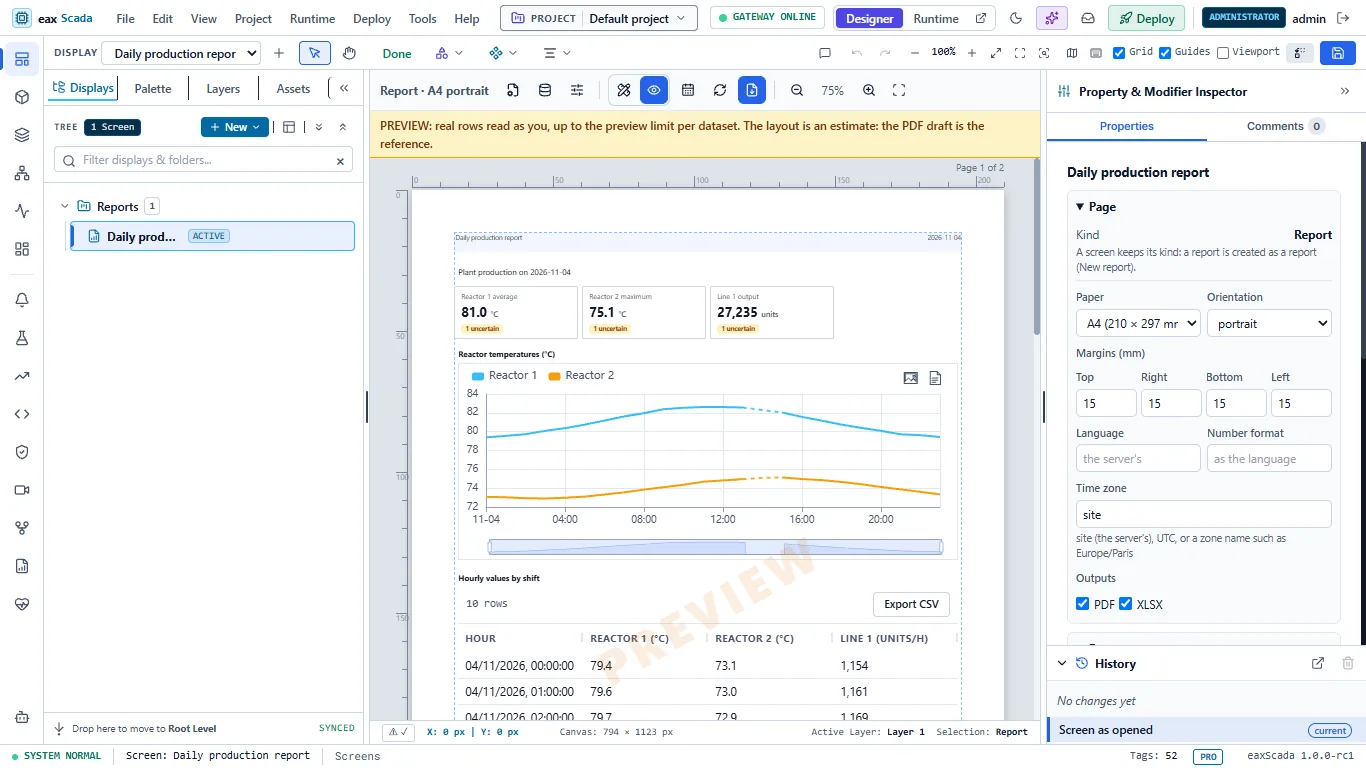
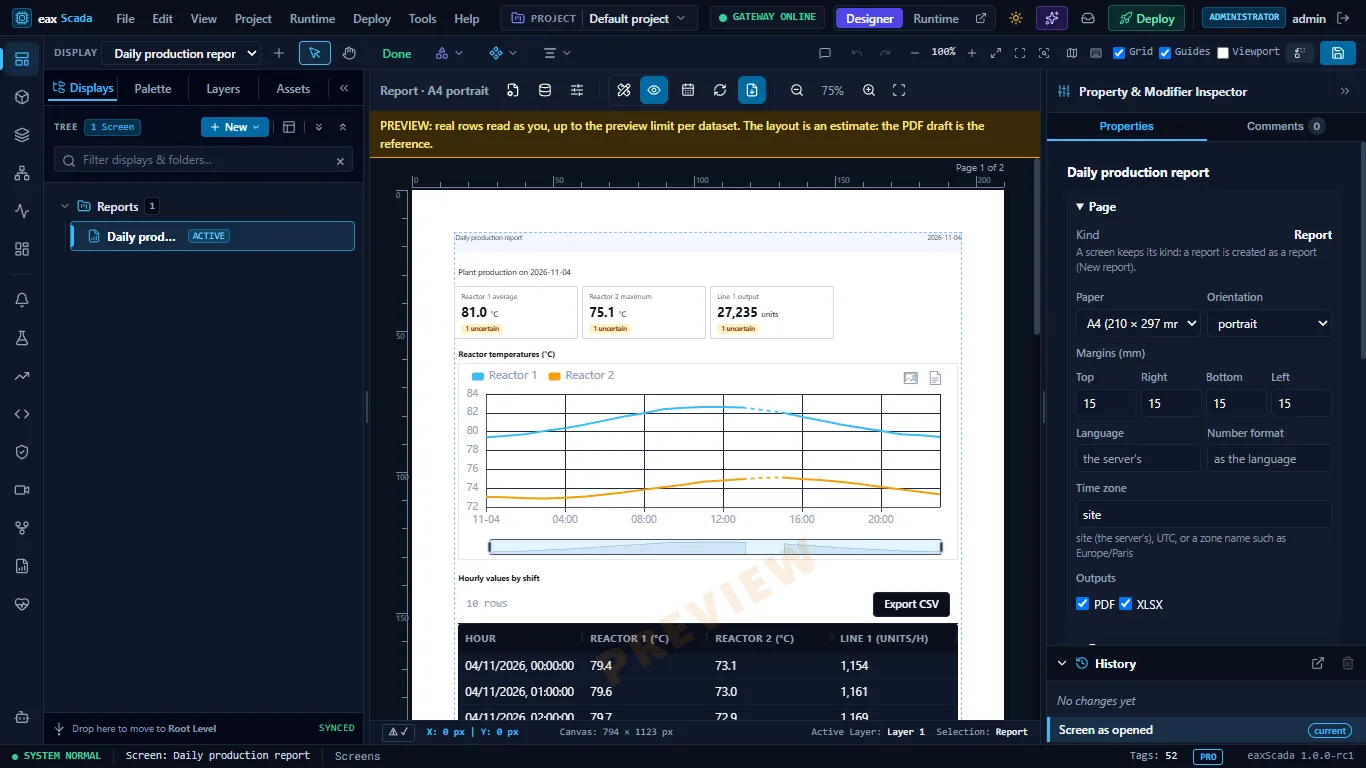
A report in the designer, previewed with real rows. Taken on a test server with sample data.
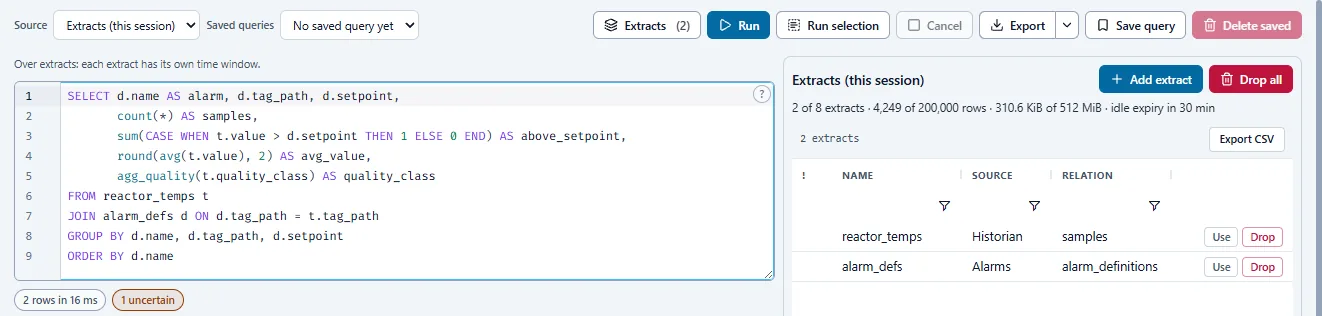
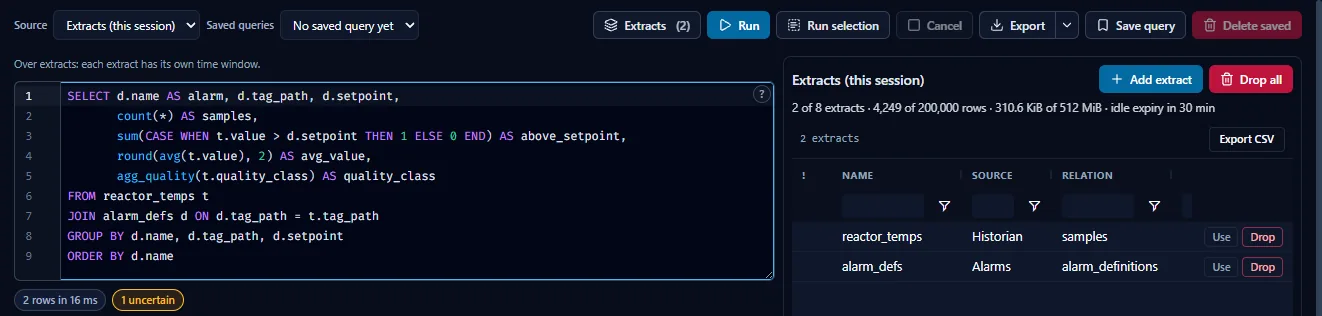
The analytics workspace: the history and the alarms joined in one query, through extracts read with the user’s rights.
- Datasets that respect read rights. Read-only queries over the history and the alarms. Each person's read rights are applied below the query, so a report never includes a tag its reader may not see, and says how many were hidden.
- Designed like a screen. Paper and margins, a header and footer, KPI tiles, tables with subtotals, charts and repeat groups, with a PDF draft. Versioned and deployed with the project.
- Never better than the plant. Bad and uncertain values are always marked, by more than colour; a total is good only if every value in it is good; simulated values are flagged. A report reads, and never writes.
- Scheduled and delivered. Run a report at a set time, at the end of each shift, when a batch ends or when a tag turns on. E-mail sends a link by default, and goes outside eaxScada only to approved domains; files can also go to a folder on the server.
- Signed, and kept as signed. Part 11 review and approval with an e-signature; by default the approver is neither the reviewer nor the person who ran the report. Each signature adds a signed copy with a signature page, and the original never changes. Every file is checked by its SHA-256 hash; unsigned reports are kept at least 3 years, signed reports are never purged.
- Your own questions, across sources. The analytics workspace runs your own SQL over the history and the alarms, with your read rights and the quality of every row marked. Export a whole result or a dataset as CSV, Excel or Parquet, join the history and the alarms through extracts of your own session, and pivot a large result on the server. Limits refuse an export, never cut it.
The parts that usually cost extra.
In the edition, not in a module price list.
Other systems often sell a historian, an audit trail, batch records, genealogy, OEE or reporting as separate products or add-on modules, and count tags and clients. Each eaxScada edition includes the features below, with unlimited tags, displays and clients, for one perpetual licence per server.
Starter
$499 plannedIncluded from Starter
- Unlimited tags, displays and clients
- Every industrial driver, no driver packs
- Columnar historian in the server, with a verified nightly snapshot
- Hash-chained audit trail in its own database
- E-signatures recorded in the audit trail, e-signed PLC deploys
- Recipes and batch records
- Project checkpoints (FAT, SAT), signed revert, archives and scheduled backups
- ISA-18.2 alarms with a controller handshake
- Embedded NATS broker with an ISA-95 Unified Namespace
- Screen version history: compare and restore
- 3D digital twin player
- MCP AI gateway with a person approving every write
Pro
$1,999 plannedAdded in Pro
- Part and lot genealogy: trace, recall, PLC handshake
- OEE and downtime
- Analytics and Reports: PDF and Excel, scheduled, Part 11 signed
- Analytics workspace: SQL over history and alarms, CSV, Excel and Parquet export
- Hive-partitioned Parquet export of the history
- DVR recorder: every PLC scan, step by step
- 3D design and the 3D model library
- LDAP / Active Directory and OIDC single sign-on
- Review before deploy
- AI assistant in the Studio and the eaxPLC IDE
Enterprise
$5,999 plannedAdded in Enterprise
- Hot standby: a primary and a backup, with alarm, batch, audit and eaxTags state replicated
- Two-person review before deploy
- The signed shift log
- Transparent encryption of the historian at rest
- Priority support in year 1
Each edition includes everything in the one before it. Planned prices: nothing is sold before 2027. eaxScada Free evaluates nearly every feature in 60-minute sessions, not for production.
Editions and planned pricingeaxScada · ONE-PROGRAM ARCHITECTUREFive Industrial Engines.
One Program.
Traditional SCADA often means a stack of services, a separate SQL database server and installed desktop clients. eaxScada runs every subsystem in one server program, web studio included: no database server, message broker or runtime to install. In Pro, the analytics engine ships as one library file next to it.
Unified Namespace (UNS) & NATS Core
Embedded NATS v2.15 messaging core with JetStream persistence, Key-Value stores, and an ISA-95 hierarchical namespace. No separate message broker to install or keep running.
Core Technical Capabilities:
// Publishing a value on the UNS (illustrative)
nats.Publish("uns.telemetry.plant1.reactorA.cell1", &TelemetryPayload{
    Timestamp: time.Now().UnixNano(),
    Quality:   QualityGood,
    Values:    map[string]float64{"Temp": 78.4, "Pressure": 4.12},
})LIVE L1 TAG ENGINE SIMULATIONLock-Free Struct-of-Arrays (SoA)
Simulated values in your browser • Scan Cycle #142,890
Rewind your plant.
Scan by scan. In 3D.
A trip at 03:12 last night? Don't guess from a trend with one-second samples. Play the controller back cycle by cycle and see what it saw and what it decided.
DVR Recorder
A flight recorder inside eaxPLC. Traditional PLC traces usually record a few pre-selected channels around a trigger you had to set in advance. The DVR records continuously at the scan rate, so the moment you need is already on tape.
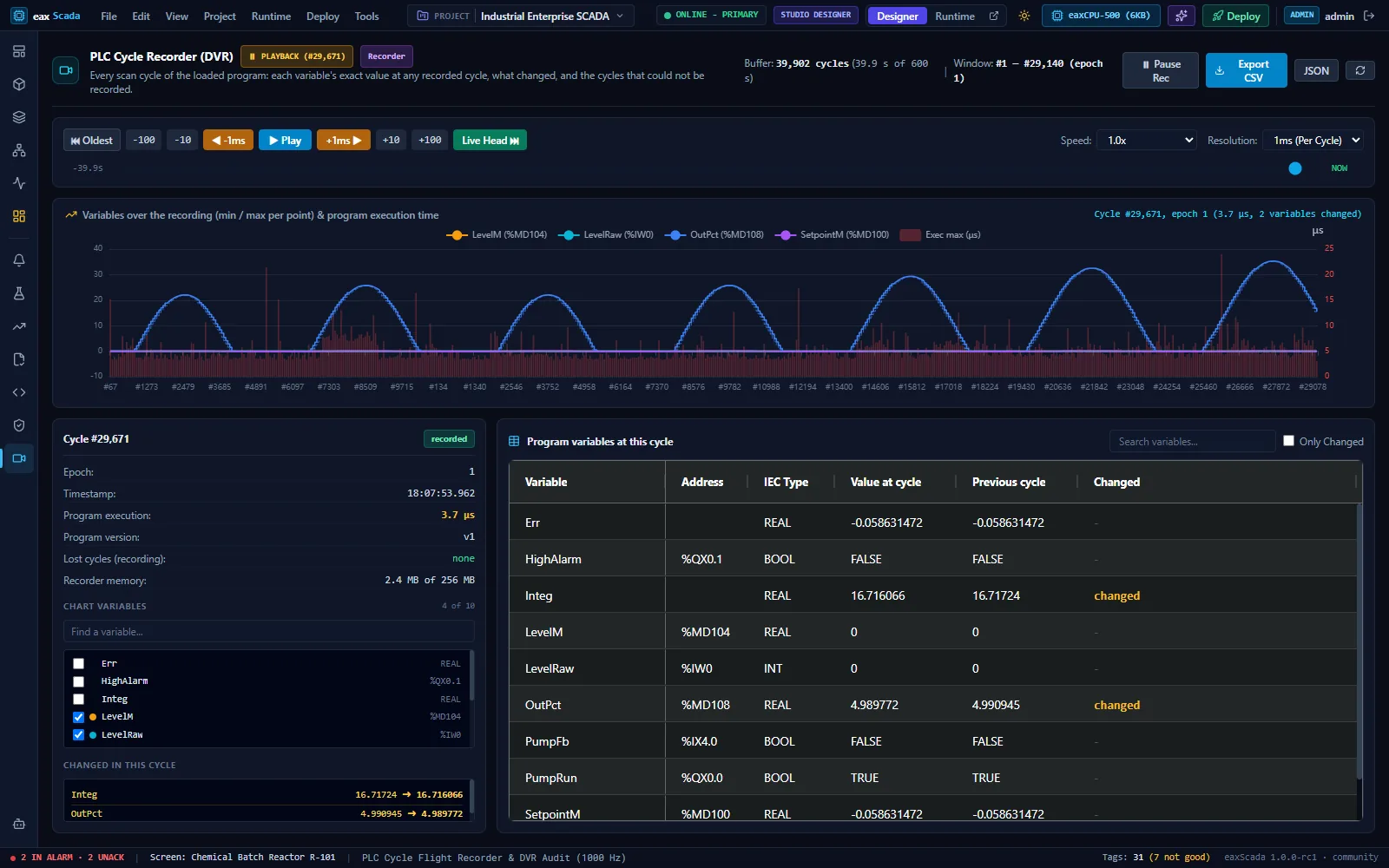
- Your program, by name. Every variable the loaded program uses, with its address and IEC type, at every recorded scan. Ten minutes of history by default, configurable.
- Nothing silently missing. Each cycle is attributed to the exact program version that ran it, even across hot deploys. A cycle that could not be recorded is counted and shown, never hidden. Zero allocations in the scan.
- Step, play, filter. Step one cycle at a time, play back at any speed, or jump straight to the cycles where something changed.
- Evidence, not anecdotes. Export the window as CSV for the incident report or the batch record.
3D Digital Twins
The same tags that drive your 2D screens drive a live 3D model of the plant, in the browser, with no plug-in or separate package.
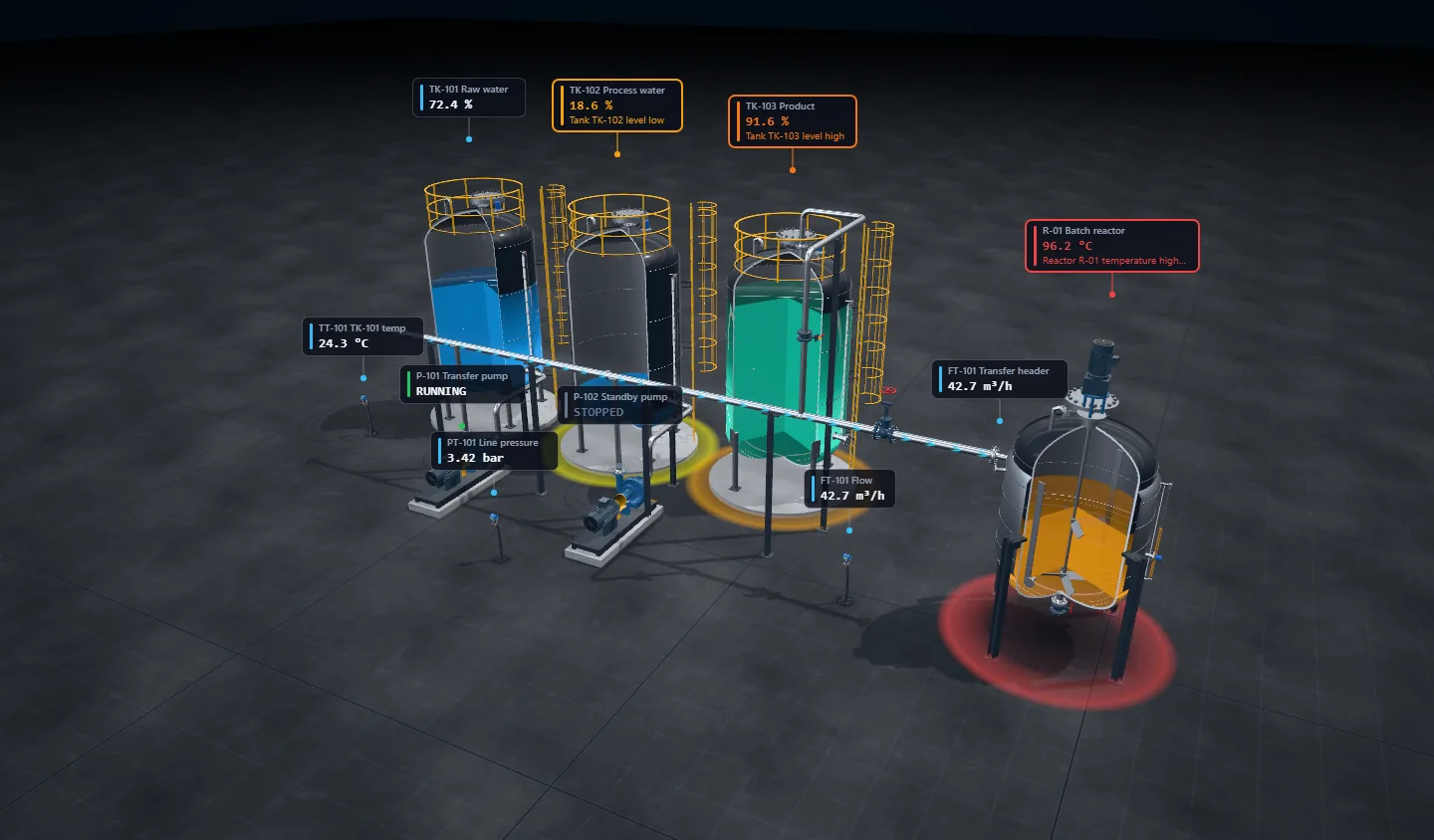
- Tag-driven equipment. Tanks fill, pumps spin and valves move from live UNS tags. Alarms glow on the equipment itself.
- Walk through it. Orbit, first-person, or put on a VR headset straight from the browser.
- Twin before steel. Drive the twin from eaxSim: your real PLC programs against simulated physics, with injected faults, before commissioning.
- From one skid to a compound. Zoom from a globe of thousands of simulated sites down to a single PLC.
Your plant's SCADA.
A car-grade touchscreen.
The same eaxScada that runs a plant built this vehicle centre screen: 2D screens and a live 3D scene on one display, driven by a simulated car running on eaxPLC. Every control is a real closed loop.
Opens the public demo on the drive screen, in a new tab. No sign-up.
- Live 3D, driven by the PLC. Traffic, lanes and speed in the 3D view come from PLC values, next to the 2D gauges and cards on the same screen.
- Every control is a closed loop. Each button writes a PLC tag through the normal write permissions, and the PLC answers: it refuses to open the trunk while moving and brings the car to a stop before Park.
- 11 screens. Drive, controls, climate, charging, driving assist, tyres & service, energy, display, media, phone and navigation.
- Real alarms. A slow leak raises a real eaxScada alarm on the tyres & service screen, with acknowledge, shelve and export.
- Live charging curve. Charging power and state of charge as a chart or as values, from the same samples.
- Light and dark. Every element follows the theme, the 3D scene included.
- No custom code. Built in the eaxScada editor, the same one you use for plant screens.
Light and dark, every element
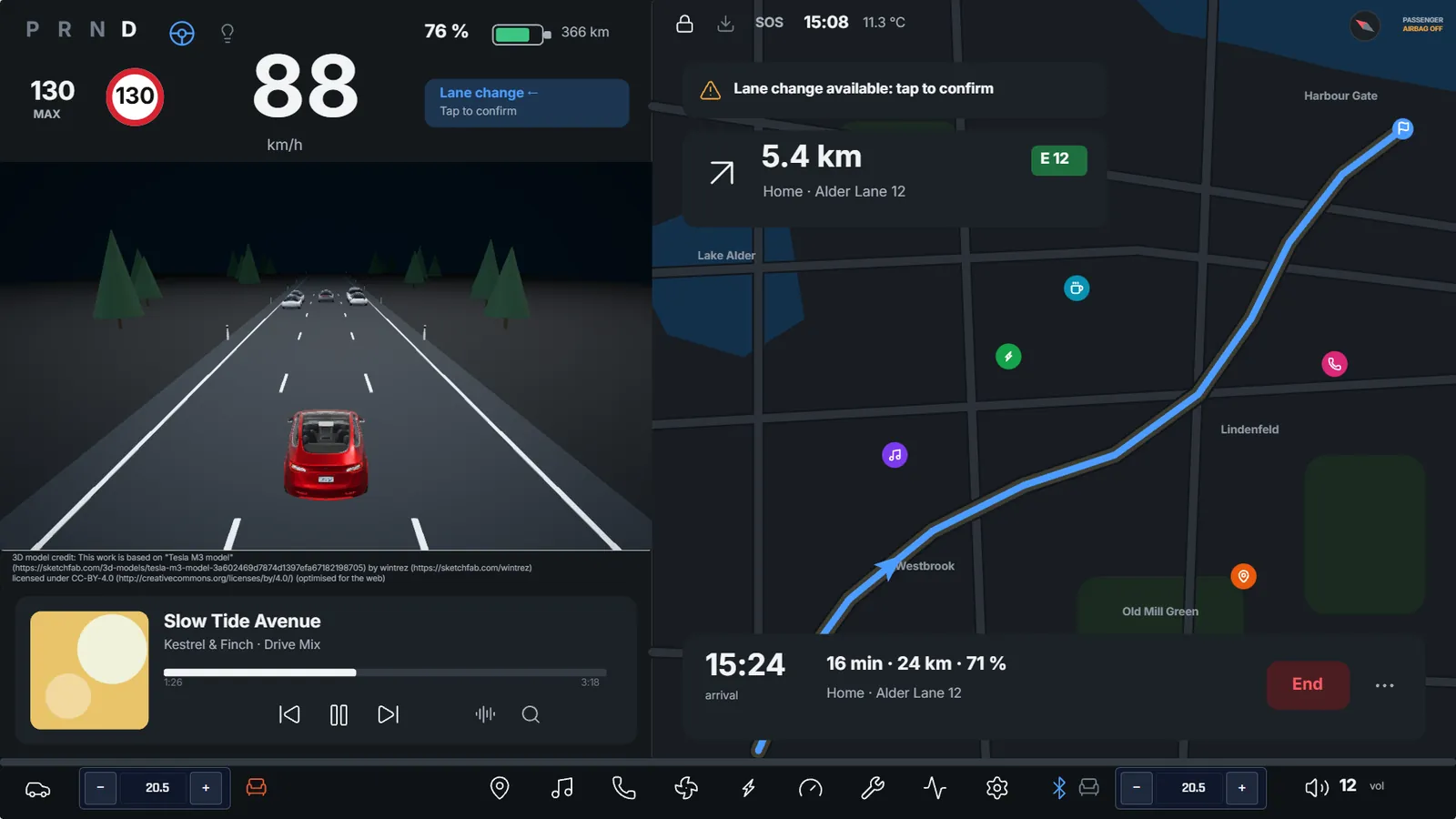
One switch on the display screen changes the 2D cards, the map and the 3D scene together.
More screens
3D car model: This work is based on "Tesla M3 model" (https://sketchfab.com/3d-models/tesla-m3-model-3a602469d7874d1397efa67182198705) by wintrez (https://sketchfab.com/wintrez) licensed under CC-BY-4.0 (http://creativecommons.org/licenses/by/4.0/) (optimised for the web)
Your whole plant.
One live map.
Lay out tanks, pumps, valves and pipes on a tile grid in the eaxScada editor, bind them to your tags, and operators get a plant map they can turn, zoom and click, with the same commands and checks as every other screen.
Opens the public demo on the isometric plant view, in a new tab. No sign-up.
- Built from blocks. Tanks, pumps, valves, instruments and buildings from the block library; pipes, cable trays and walkways connect themselves as you draw.
- Live and honest. States, tank levels, values and alarms come from your tags. A value with bad quality is drawn grey and dashed, never in its last good colour.
- Same commands, same checks. A block runs a 2D button's command, with the same confirmation, electronic signature, interlock and write permissions.
- Turn, zoom, keyboard. Four view directions, pan and zoom, and every block reachable from the keyboard.
- Phone ready. On a phone, every block becomes a card with its state, value, alarm and command.
Editor and runtime
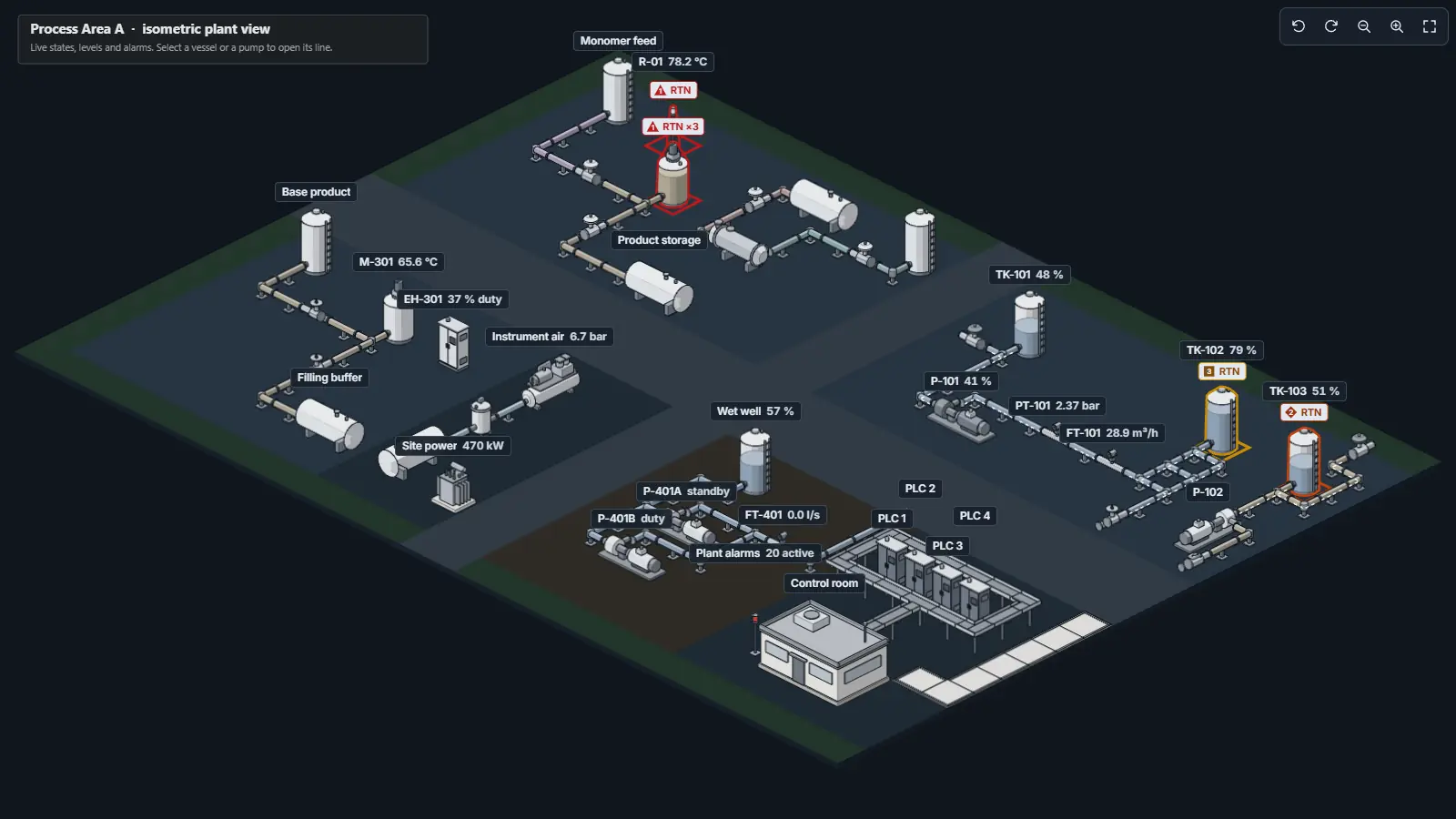
Light: the screen in the editor. Dark: the same screen live in the operator runtime, with colour kept for what is abnormal.
On a phone
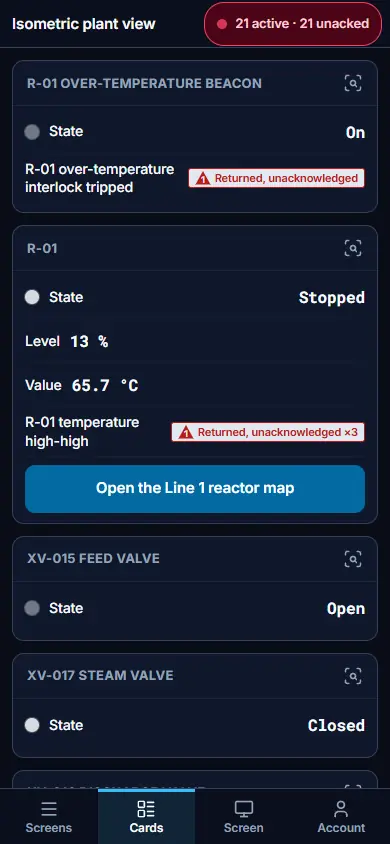
Every block that shows a value or runs a command gets a card, with no extra design work.
Established platforms are good.
Here is where we differ.
A side-by-side with Ignition, Siemens WinCC, Rockwell FactoryTalk and AVEVA InTouch, based on their public product pages and price lists.
| Capability | eaxware | Ignition | Siemens WinCC | Rockwell FactoryTalk | AVEVA InTouch |
|---|---|---|---|---|---|
Licensing & Price No tag, display or client counting: editions differ by features. Planned: one perpetual licence per server that keeps working without a plan, with security updates for 5 years. | Planned pricing (not on sale before 2027): Free $0 for evaluation (every feature, 60-minute sessions) · Starter $499 · Pro $1,999 · Enterprise $5,999 per server, perpetual, with 5 years of security updates and 1 year of support and new versions; then an optional plan at 18 %/yr. Unlimited tags, displays and clients in every paid edition | Platform $1,200 + modules (e.g. Perspective $11,225); a typical full server ≈ $19–22k. Unlimited tags. Support 16–24 %/yr | WinCC Unified licensed by PowerTag count; sold via distributors (e.g. ≈ $8k for 5k PowerTags) | FactoryTalk View SE licensed per server and display count; quote-based | InTouch Unlimited $12,360–20,600 list; InTouch Workstation $1,850 (1,000 tags) |
Industrial Historian Built into the server in every edition, with no database server to install; upgrading the licence keeps the history where it is. | Embedded DuckDB columnar engine in every edition, one store with a verified nightly snapshot · Pro: PDF and Excel reports, part and lot genealogy and Parquet export | Built-in Core Historian (8.3) or an external SQL database | WinCC logging; WinCC Process Historian as a separate product | FactoryTalk Historian as a separate product | AVEVA Historian (tag allowance included in InTouch Unlimited) |
Deployment No configuration to write before the first start: the web studio is built in and a fresh install creates its defaults. | One server program for Windows or Linux (x86-64 or ARM64); no database server, broker or runtime to install. Pro adds one library file for its analytics engine | Cross-platform gateway installer (Java runtime bundled) | Windows runtime, engineered in TIA Portal | Windows servers with FactoryTalk Services Platform | Windows; System Platform for multi-node |
Screen Designer Nothing to install for engineers: design, test and run in the same browser tab. | Designer and runtime both in the browser; 3D digital twin player in every edition; procedural piping, 3D design and the 3D model library in Pro | Desktop Designer launched from the gateway; Perspective runtime in the browser | Engineering in TIA Portal (Windows); Unified runtime in the browser | FactoryTalk View Studio (Windows); web runtime with FactoryTalk Optix | WindowMaker / OMI on Windows; web clients available |
PLC Scan-by-Scan Replay (DVR) Records continuously at the scan rate, so there is no trigger to set up before the incident. | Flight recorder inside eaxPLC: every scan timestamped, step and play back cycle by cycle | Historian playback at the logging rate | Controller trace of selected signals around a trigger | Trends and data logging of selected tags | Historian playback at the logging rate |
Unified Namespace (UNS) The broker is part of the product, and the same namespace is designed to federate into eaxCloud (in development). | Embedded NATS broker with an ISA-95 namespace, JetStream and KV, in every node | MQTT / Sparkplug via Cirrus Link modules | OPC UA; MQTT via connectors or Industrial Edge | OPC UA / MQTT via FactoryTalk Optix or third-party gateways | OPC UA / MQTT via communication drivers |
AI Integration Operator-side AI with a human in the loop for every write, on the edge, without a cloud dependency. | MCP gateway for AI agents: read access by role, setpoint writes only with operator e-signature | Scripting, REST and third-party modules | Engineering copilot (Siemens Industrial Copilot) | FactoryTalk Design Studio Copilot (engineering, cloud) | Industrial AI Assistant on AVEVA CONNECT (cloud) |
Redundancy Everyone offers redundancy; it is included in the planned Enterprise edition. | 1-to-1 hot standby, included in Enterprise (planned $8,999 for the primary + backup pair) | Redundant backup gateway (additional licence) | Redundancy option for WinCC | Redundant HMI servers in FactoryTalk View SE | Redundant InTouch / Application Server |
Soft PLC in the Same Ecosystem Control and SCADA share one namespace, one security model and one cloud, on standard industrial PCs. | eaxPLC: IEC 61131-3 Structured Text, 1 kHz scan, EtherCAT / EtherNet/IP / Modbus TCP masters. eaxPLC Free is planned at $0, free for production use; fieldbus masters planned from $79 | SCADA only; controllers from other vendors | S7-1500 hardware controllers or the S7-1500 Software Controller | Logix hardware controllers | SCADA / HMI only; controllers from other vendors |
✓ offered · – offered differently or as a separate product · ✕ not part of the product.
Prices are public list or distributor prices seen in September 2026, in USD; vendors change them and discounts are common. Spotted something out of date? Tell us and we will correct it.
Product and company names are trademarks of their respective owners, used only to identify the products compared; eaxware is not affiliated with or endorsed by them.

 eaxPLC · THE COMPANION SOFT PLC
Need a controller too?
eaxPLC, the soft PLC beside eaxScada.
eaxScada works with the PLCs you already have. When you want a soft or virtual PLC, eaxPLC is a deterministic IEC 61131-3 runtime and web Studio that runs on a standard x86-64 industrial PC, in a container, or on your laptop, secured by eaxScada’s users and audit trail. ARM64 builds run the same programs on the bytecode VM.
Scan loop jitter ≈ 14 µs p99 at 1 kHz, measured on Windows x86-64.
IEC 61131-3 Structured Text, compiled
Every deploy compiles to amd64 machine code in microseconds: 8.3× faster than the reference VM on PackML programs. A differential test keeps the JIT and the VM in lock-step.
1 kHz scan, zero allocations
The scan runs with 0 allocs/op on a locked OS thread, so garbage collection never runs inside a cycle. Opt-in SCHED_FIFO, CPU pinning and mlockall on Linux (eaxPLC Performance).
Hot reload without a missed scan
New logic is swapped atomically at a cycle boundary. Deploy and rollback ask for an e-signature verified by eaxScada (on by default, set per project) and land in the audit trail.
Fieldbus masters
Modbus TCP, EtherNet/IP Class 1 and EtherCAT (Linux) masters drive the %I/%Q image directly. EtherCAT ran 3,000 cycles at 1 ms without a working-counter error against virtual slaves that an independent open-source master also drives to OP; tests on physical EtherCAT hardware are next. Applying a change restarts only what it touches (a Modbus TCP or EtherNet/IP device, or a whole EtherCAT line); the rest keeps exchanging I/O.
I/O configurator you can export
Scan the bus, map slaves and PDOs to process-image addresses in a spreadsheet-style configurator, and export the configuration as a file that goes into Git.
Secured by eaxScada
Every API call needs a signed PLC token or an eaxScada session with the right role. Tokens are verified offline, so the PLC keeps working when eaxScada is down.
Rename a signal everywhere, safely
Project-wide search and replace across POUs, ladder, variable docs, tasks and fieldbus mapping. Replace edits only your checked-out drafts, after a preview, with one undo; it never deploys. Every edition.
Live values where you read the code
Hover a variable for its value, quality and force state. Save the signals you watch as trend sets, versioned with the project, with chart and values side by side and CSV export. Every edition.
Know what you deploy
Compare the running program, the saved project, your drafts and any revision, line by line for ST and rung by rung for ladder, and merge into your draft. The running program is never changed. Every edition.
MQTT and Sparkplug B inputs
Map Sparkplug B metrics and JSON topics onto %I inputs, with a quality bit the program reads on every entry. A value that does not convert exactly is refused, never clamped. Network I/O, never for safety functions. eaxPLC Standard and Performance.
Reviewed deploys and rollbacks
With a review required, the Studio attaches eaxScada’s signed approval of exactly the program you deploy or the version you roll back to, and requests the review for you when there is none. Every edition.
Inputs only the field can write
An input a fieldbus, an MQTT source or a plant simulator drives is shown read-only, and every outside write onto it is refused and audited. A force stays the deliberate way to override a device. Every edition.

 eaxCloud · MULTI-TENANT CONTROL PLANE · IN DEVELOPMENT
Every site a leaf.
One nervous system for the fleet.
How it will work: eaxScada and eaxPLC connect to eaxCloud as NATS leaf nodes over a single outbound TLS connection, and each customer gets its own NATS account, isolated cryptographically. Sites never depend on the cloud: they keep running locally when the WAN drops.
The eaxCloud portal: accounts, organisations, members and roles, sign-in with a second factor or a passkey, sites, licences and downloads. Its shop runs in test mode; nothing is sold before 2027. Fleet management, remote access, cloud history, change tracking and signed updates are in development, with early access in 2027. Virtual commissioning is lab-tested, with pilots on request.
Every eaxScada already publishes its tags on an ISA-95 Unified Namespace on NATS. eaxCloud is designed to federate the subjects each site chooses to export into your tenant, so fleet, alarms, changes and simulations become subjects in one tree. A tag such as uns.telemetry.paris.packaging.line1.filler.speed keeps its subject on the skid and in the cloud. Command subjects can never be imported from the cloud.
planned topology · one account per tenant · tier limits enforced by NATS itself · choice of region planned
Virtual commissioning
Upload your ST programs and a plant scenario: tanks, pumps, valves, motors, conveyors, heat exchangers. Many real eaxPLC instances run against it in real time or faster, with injected faults and bit-exact snapshot replay. It runs in our lab today, driven through a REST API a build pipeline can call; it is not yet a hosted service. Pilots on request.
Fleet management
Designed to show every eaxScada and eaxPLC node on one dashboard: version, health, scan rate and active alarms, across every site. Nodes will send heartbeats to the cloud; the cloud sends nothing to the site.
Remote access without a VPN
Designed to open a site HMI or the eaxPLC Studio from anywhere over the site’s outbound NATS leaf connection: no inbound port, no VPN appliance, no port forwarding. Read-only unless the site turns on remote control locally; writes and deploys use the site’s own sign-in, roles, e-signature and audit.
Asset management
A planned register of every controller, server and instrument in the fleet: model, firmware, program version, location in the ISA-95 hierarchy, and health, built from what the nodes report rather than from a spreadsheet.
Change tracking for GxP
Each eaxScada already records deploys, screen edits and setpoint changes in its own tamper-evident audit ledger, with the e-signature and the before and after state. eaxCloud is designed to bring every site’s ledger into one timeline, to support 21 CFR Part 11 and EU GMP Annex 11 audits.
Signed updates (OTA)
Commit Structured Text or screens and sign the release. The cloud will offer the signed update to each site; a person at the site accepts it, runs the site’s own checks and applies it. Nothing is applied automatically.
How it is designed: remote control stays the site's decision
- Sites will connect read-only by default. Nothing from the cloud reaches the plant unless a site administrator turns on remote control locally, a switch the cloud cannot change.
- Remote writes and deploys will use the site's own sign-in, roles, e-signature and audit ledger: the same path as a write made on site.
- Each device will generate its own key, and the private key never leaves it. Revoking a key disconnects the node from the cloud; the site keeps running locally.
- In the lab simulation service, each simulation already runs as its own Linux user in its own cgroup, with a quota.
Predictable Evolution.
From Core Pulse to v1.0 LTS.
No vaporware or hidden roadmaps. Every deliverable shows where it stands today: done, in progress or planned.
v0.4 — PLC & DVR Convergence
Convergence of real-time control logic and SCADA telemetry: the pure-Go eaxPLC engine, PLC variables as eaxScada tags, and the cycle-by-cycle DVR recorder. Fieldbus masters are still being tested.
- eaxPLC Soft-PLC Engine: Pure-Go IEC 61131-3 runtime at 1000 Hz (p99 jitter about 14 µs, measured on Windows x86-64; Linux real-time numbers not measured yet). Four PLC lines in the live demoDone
- PLC Variables as SCADA Tags: structure members and array elements by name, with the PLC’s own access rights and ranges (in the live demo)Done
- DVR Cycle Recorder: records every scan continuously; step the controller back cycle by cycle in the eaxPLC Studio and eaxScada (in the live demo)Done
- Native Code on x86-64: every deploy compiled to machine code, 8.3–8.4× faster than the interpreter on the PackML programs (measured)Done
- Fieldbus Masters: Modbus TCP and EtherNet/IP scanner with an I/O configurator, CANopen master; EtherCAT master on Linux, tested against simulated slaves onlyIn progress
- MQTT and Sparkplug B Inputs (eaxPLC Standard and Performance): broker values mapped onto PLC inputs, each with a quality bit the program reads; network I/O, never for safety functionsDone
- Reviewed Deploys and Rollbacks: the eaxPLC Studio attaches eaxScada’s signed approval of exactly the program it loads, and requests the review when there is noneDone
- Trip-Triggered Incident Capture: keep the recording around an emergency trip for later reviewPlanned
Calling Controls Engineers: Submit IEC Logic
Submit your IEC 61131-3 Structured Text routines to help benchmark the eaxPLC compiler against real-world skid logic.
User feedback directly steers our sprint priorities. Starter capabilities ship in every edition; Pro and Enterprise capabilities are tested in our own simulated plants and shown in the live demo.
Unlimited Tags, Displays and Clients.
In Every Paid Edition.
Editions differ by features, never by counts. The plan: a free edition to evaluate every feature, and perpetual licences that keep working forever, with 5 years of security updates and 1 year of support and new versions included. After that, support and new versions are an optional yearly plan. An optional cloud subscription for fleets.
Planned pricing. eaxware is in early access: licences go on sale in early 2027. Nothing can be bought today.
Free
The whole product (3D as a player, no audit trail) for learning, evaluation and proofs of concept. Not for production. The runtime runs 60 minutes at a time; restart it with one click.
Starter
Production SCADA on a single node, with unlimited tags, displays and clients. No recurring subscription.
Pro
Edge SCADA for machine skids and production plants, with the DVR recorder, 3D design and the AI assistant.
Enterprise
For pharma, food & beverage and critical infrastructure: redundancy, GxP-grade audit and encryption.
High availability pair (primary + backup): $8,999
What the licence includes
Every paid perpetual licence: eaxScada Starter, Pro and Enterprise, and eaxPLC Standard and Performance.
- Yours to keep
- One payment per server or node. The licence keeps working forever, with or without a plan.
- 5 years of security updates
- Security fixes for the version you bought, until 5 years after purchase.
- 1 year of support and new versions
- Support at your edition’s level, and every new version released in the first year.
- Optional plan after year 1
- Support and new versions continue with a yearly plan at 18% of the list price. Without it, you keep your version and its security fixes.
Planned prices: licences go on sale in early 2027. Questions about pricing for your site: contact us.
eaxPLC runtime licences
Planned pricing · per node, perpetual · Standard and Performance: 1 year of support and new versions · 5 years of security updatesStructured Text runtime, Modbus TCP, OPC UA server, NATS UNS, web Studio, signed hot deploys
+ one EtherNet/IP or EtherCAT master, MQTT and Sparkplug B inputs
+ all fieldbus masters, DVR flight recorder, real-time tuning
Volume pricing for machine builders from 10 nodes is planned.
Join early access: eaxPLCOwn the edge. Run the fleet from the cloud.
Edge licences are planned as perpetual. eaxCloud is optional: a planned monthly subscription for fleet, remote access, OTA and virtual commissioning, with additional virtual commissioning at $5 per 1,000 PLC-hours. Nothing can be bought today: join early access to hear when it opens.
Developer
Try the cloud with one site and a virtual plant.
- 1 site, up to 3 connected nodes
- Fleet dashboard and read-only remote view
- 1,000 PLC-hours of virtual commissioning / month
- CI API for your build pipelines (planned)
- 7-day cloud history
- Community support
Fleet
Run and change a fleet of sites from one place.
- 5 eaxPLC nodes included per site, then $4 per additional eaxPLC node / month
- Annual: $450 per site / year, plus $40 per additional eaxPLC node / year
- Unlimited sites
- Fleet management across all sites; asset register (planned)
- Fleet-wide change tracking: deploys, screen edits, setpoints
- Remote HMI and Studio: read-only unless the site turns on remote control locally; writes and deploys use the site’s own sign-in, roles, e-signature and audit
- Signed updates offered by the cloud, accepted and applied by a person at the site after the site’s own checks; never applied automatically
- 20,000 PLC-hours of virtual commissioning / month included
- 90-day cloud history (longer as an add-on)
- Business-hours support
Enterprise
Compliance, with dedicated infrastructure and residency on request.
- On request: a dedicated NATS cluster, or the control plane on-prem
- On request: data residency per region
- SSO / SCIM and IP allow-lists (planned)
- Pooled virtual commissioning capacity
- GxP change-control workflows and 21 CFR Part 11 / Annex 11 audit export
- On request: 24/7 support and an SLA
Today the eaxCloud portal (accounts, organisations, sign-in, licences, a shop in test mode) is in early access, invite only. Fleet management, remote access, cloud history, change tracking and signed updates are in development, with early access in 2027. Virtual commissioning is lab-tested, with pilots on request. Planned pricing, not an offer: nothing can be bought today. 1 PLC-hour = 360,000 scans (one PLC at 100 Hz for an hour).
Be First on the Plant Floor.
Join Early Access.
eaxScada, eaxPLC and eaxCloud are not released yet, and nothing is sold today. Join the early-access list and we will contact you when early access opens. Until then, the live demo is open to everyone.
DuckDB columnar analytics, procedural smart piping, the 3D viewport and audit trails designed for 21 CFR Part 11: see them in the live demo today, and tell us you want Pro when early access opens.